
Updated: 2026-03-07

Webull Trading Journal: Track & Analyze Your Webull Trades

Webull is defined as a commission-free trading platform launched in 2017, primarily serving US retail traders in stocks, options, ETFs, and crypto. With over 20 million registered users, it is one of the most popular retail trading apps in North America. Webull's built-in analytics provide account performance summaries and trade history — but according to Barber and Odean's 2000 analysis of 66,465 brokerage accounts (Journal of Finance), the behavioral patterns that separate consistently profitable traders from the 74–78% who lose money are invisible without statistical behavioral analysis. That gap is exactly what Tiltless fills.
Webull Trading Journal: Track & Analyze Your Webull Trades

Does Webull Have a Built-In Trading Journal?

Webull provides more native analytics than most commission-free brokers. Inside the app and desktop platform you can view your account P&L over any date range, a daily P&L chart, a trade history log with entry and exit prices, a win/loss count for closed positions, and a breakdown of realized gains by symbol. For basic performance tracking this is useful — far better than nothing.

What Webull does not provide is behavioral analysis. The platform answers 'how much did I make or lose?' but cannot answer 'why is my performance degrading?' The analytics show no post-loss win rate — you cannot see whether your trades taken after a losing trade perform worse than baseline. There is no session fatigue scoring, no time-of-day performance curve, and no revenge trade detection. Webull does not flag when your position sizing drifted upward after a streak of losses.

According to the European Securities and Markets Authority (ESMA) and the UK Financial Conduct Authority (FCA), 74–78% of retail derivative accounts lose money. Barber and Odean's landmark 2000 study of 66,465 brokerage accounts found that active retail traders underperform passive benchmarks by 6.5% per year — a gap attributed to behavioral decisions, not to strategy selection. The implication is clear: the missing layer in Webull's analytics is precisely the behavioral layer that accounts for the majority of retail underperformance.

  • What Webull shows: account P&L, daily P&L chart, trade history log, win/loss count, realized gains by symbol
  • What Webull lacks: post-loss win rate, revenge trade detection, time-of-day performance curves, session fatigue scoring, position sizing drift analysis
  • The gap matters: behavioral patterns — not strategy — explain most of the 6.5% annual underperformance documented by Barber and Odean (2000)

How to Export Your Webull Trade History

Webull supports trade history export via CSV on both the mobile app and the desktop platform. The desktop path provides the most complete data set and is recommended for importing into a trading journal.

On Webull Desktop (recommended): Open the Webull desktop application and log in. Navigate to the 'Orders' tab in the top navigation bar. Select 'History' from the sub-menu. Choose your desired date range — Webull allows up to 90 days per export. Click the export or download icon (a downward-pointing arrow) in the top-right corner of the History panel. The file will download as a CSV.

On the Webull Mobile App: Tap the account icon (bottom-right) to open your account overview. Scroll to 'My Assets' and select 'Transactions' or 'History'. Use the filter to set your date range. Tap the share or export icon at the top of the screen. On iOS, use the share sheet to save to Files; on Android, the CSV saves directly to Downloads.

The exported CSV includes order date, order time, symbol, side (buy/sell), quantity, average price, and total amount. For options trades, the export includes the full contract description including expiry, strike, and call/put designation. If you need data beyond 90 days, export in 90-day increments and combine before importing.

  • Desktop path: Orders → History → set date range → export icon (top-right) → CSV download
  • Mobile path: Account icon → Transactions/History → filter date range → share/export icon → save to Files or Downloads
  • Export limit: 90 days per file — export in batches and combine for longer histories
  • Options included: contract description (symbol, expiry, strike, call/put) is included in the CSV

How to Import Webull Data into Tiltless

Once you have your Webull CSV, importing into Tiltless takes under two minutes. Tiltless recognizes the Webull CSV format automatically and handles column mapping without manual configuration.

Navigate to tiltless.ai/signup and create a free account. From the dashboard, select 'Import Trades' and choose 'Webull' as your broker. Upload your CSV file. Tiltless automatically maps the Webull columns — symbol, date, time, side, quantity, price, amount — to the Tiltless data model. For options trades, Tiltless parses the contract description and populates expiry, strike, and call/put fields automatically.

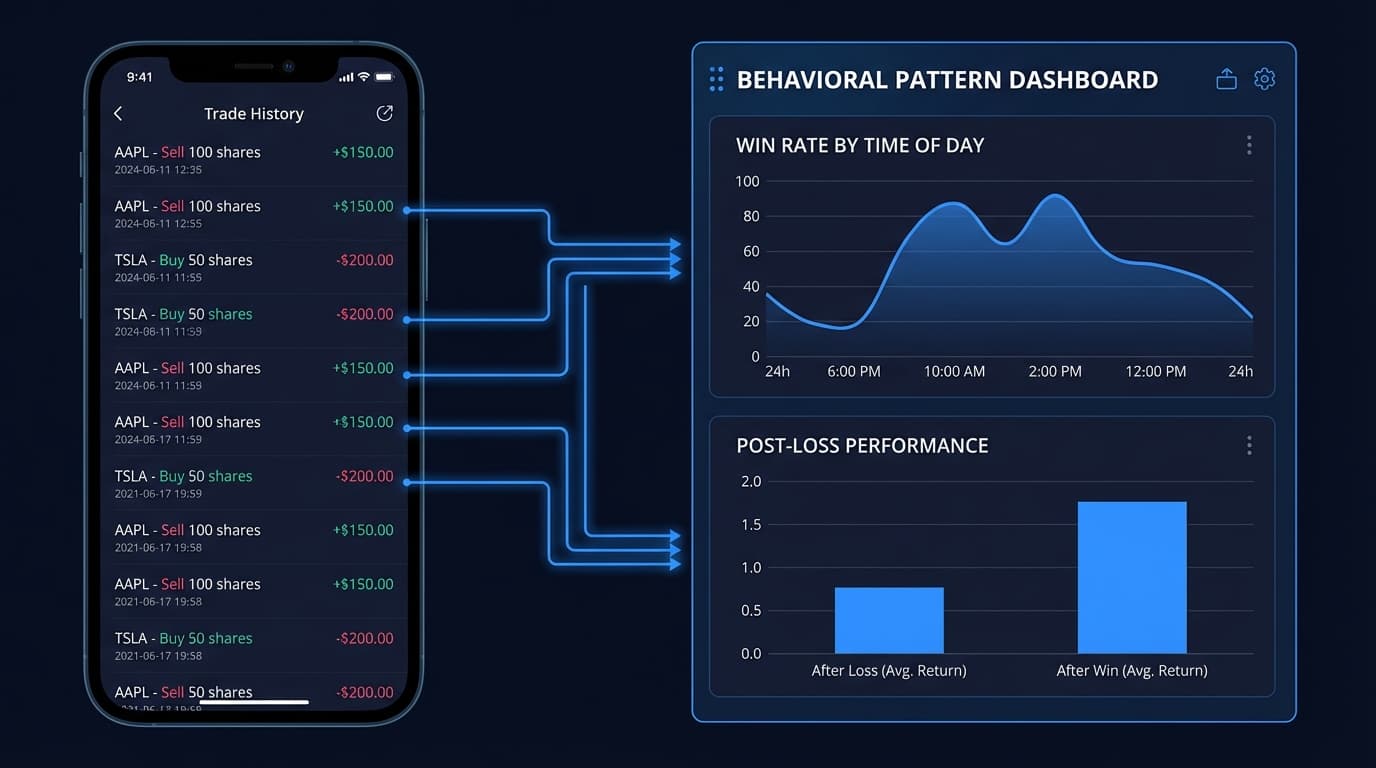
After import, Tiltless computes your full behavioral profile: win rate by time of day, post-loss win rate versus baseline, position sizing consistency, session fatigue curve, and Edge Lab analysis for each setup. If you have multiple CSV files from different date ranges, you can import them sequentially — Tiltless deduplicates on order ID to prevent double-counting.

For a complete walkthrough of journaling best practices applicable to any broker, see the [Stock Trading Journal](/blog/stock-trading-journal) guide.

  • Sign up free at tiltless.ai/signup — no card required
  • Select 'Import Trades' → choose 'Webull' → upload your CSV
  • Column mapping is automatic — Webull format is pre-configured
  • Options contracts auto-parsed: expiry, strike, and call/put populate from the contract description
  • Multiple CSV files supported: import sequentially, Tiltless deduplicates by order ID

What Behavioral Patterns Webull Can't Show You

Webull traders are disproportionately active during pre-market (4:00–9:30 AM ET) and after-hours (4:00–8:00 PM ET) sessions. These extended-hours sessions carry wider spreads, thinner liquidity, and higher volatility — conditions that amplify behavioral errors. Webull's analytics do not distinguish extended-hours performance from regular-session performance, which means a trader losing money in pre-market while breaking even in regular hours will see only a combined negative number with no diagnostic signal.

Tiltless breaks this down by session segment. Time-of-day performance curves show your win rate and average R-multiple plotted across every 30-minute interval of the trading day, including pre-market and after-hours. For most traders, this analysis reveals that their extended-hours performance is materially worse than regular session performance — and that a simple rule to restrict pre-market trading would significantly improve their overall results.

Post-loss win rate analysis is the second critical behavioral metric Webull cannot provide. According to the behavioral finance literature, the propensity to take revenge trades — entering positions to recover recent losses rather than because a genuine setup is present — is one of the most consistent loss-generating patterns in retail trading. Tiltless calculates your win rate on trades taken within 30 minutes of a losing trade and compares it to your baseline win rate. For traders with a revenge trading pattern, this single metric is often the most valuable output in the entire analysis.

Session fatigue scoring tracks how your performance degrades over the course of a trading session as measured in hours and in trade count. Many Webull traders find their first two or three trades significantly outperform their later trades — and that enforcing a maximum trade count rule based on this data produces an immediate improvement in monthly P&L. For a full framework on reviewing this data systematically, see [How to Review Your Trades](/blog/how-to-review-trades).

  • Pre-market and after-hours segmentation: Tiltless separates extended-hours performance from regular-session — critical for Webull traders who are active before 9:30 AM
  • Post-loss win rate: calculates your win rate on trades taken within 30 minutes of a loss versus your baseline — the primary revenge trade diagnostic
  • Time-of-day curves: 30-minute interval performance plotting across the full trading day including extended hours
  • Session fatigue scoring: tracks win rate and average R-multiple as a function of hours traded and trade count within a session
  • Position sizing drift: detects when your position sizes increase after losses — a common pattern that amplifies drawdowns

Webull Options Traders: Behavioral Analysis for Multi-Leg Trades

Webull has become a popular platform for retail options traders, offering commission-free options trading with access to complex multi-leg strategies including spreads, straddles, and iron condors. Webull's options analytics show realized P&L per contract and a history of exercised and expired options — but provide no behavioral analysis specific to options trading patterns.

Options trading introduces behavioral risks that are structurally different from equity trading. The leverage embedded in options contracts means that behavioral errors are amplified: a 2x leveraged equity position can double a loss, but an out-of-the-money option bought as a lottery ticket can expire worthless at 100% loss. Tiltless tracks options trades as first-class objects in its data model, recognizing contract type, expiry, and strike from the Webull CSV export automatically.

For Webull options traders, Tiltless provides several analyses unavailable in the platform itself. Win rate by options type (calls versus puts, long versus short, single-leg versus multi-leg spreads) shows whether your directional bias or your strategy type is the primary edge driver. Behavioral patterns around expiration dates — whether your decision-making degrades as weekly options approach Friday expiry — are visible in the time-of-day and day-of-week performance curves. Average holding period analysis for options positions reveals whether you are consistently exiting too early (selling before maximum favorable excursion) or holding too long (letting winning positions decay back to breakeven).

For a complete guide to options behavioral analysis applicable across all brokers, see the [Options Trading Journal](/blog/options-trading-journal) guide.

  • Options fully supported: Tiltless parses Webull options CSV including expiry, strike, and call/put — no manual entry required
  • Win rate by contract type: compare performance across calls, puts, long options, short options, and multi-leg spreads
  • Expiration behavior: time-of-day and day-of-week curves reveal whether Friday expiry creates degraded decision-making
  • Holding period analysis: identifies early exit patterns (selling before MFE) and late hold patterns (letting winners decay)
  • Leverage amplification: behavioral errors in options produce larger P&L impacts — making behavioral analysis more valuable, not less

Related Resources

FAQ

?Does Webull have a trading journal feature?

Webull has built-in trade history and account analytics but does not have a trading journal feature. The platform shows realized P&L, a daily P&L chart, win/loss count, and trade history by symbol and date range. It does not provide behavioral analysis: there is no post-loss win rate, no revenge trade detection, no time-of-day performance segmentation, and no session fatigue tracking. For behavioral journaling, traders export their Webull CSV and import it into a dedicated trading journal like Tiltless.

?Can I import Webull trades into Tiltless?

Yes. Tiltless supports Webull CSV imports directly. Export your trade history from Webull Desktop (Orders → History → Export) or the mobile app, then upload the CSV to Tiltless from the Import Trades menu. Tiltless automatically maps Webull's column format and populates your behavioral profile — post-loss win rate, time-of-day curves, position sizing analysis, and Edge Lab setup scoring — without any manual column configuration.

?Does Tiltless support Webull options trades?

Yes. Tiltless parses Webull's options CSV export automatically, recognizing the contract description format that includes symbol, expiry date, strike price, and call/put designation. Options trades are tracked as first-class objects with full behavioral analysis: win rate by contract type, holding period distribution, expiration-week behavior, and comparison of long versus short options performance. Multi-leg strategies exported from Webull are also supported.

?What's the difference between Webull analytics and Tiltless?

Webull analytics answer 'how much did I make or lose?' — account P&L, trade history, and win/loss count. Tiltless answers 'why is my performance what it is?' — post-loss win rate, time-of-day performance curves (including pre-market and after-hours segmentation), revenge trade detection, session fatigue scoring, position sizing drift analysis, and Edge Lab statistical significance testing on your setups. Webull shows outcomes; Tiltless reveals the behavioral patterns that produce those outcomes.

Import Your Webull Trades — Free

Webull shows you what happened. Tiltless shows you why. Import your Webull trade history CSV and get your full behavioral profile: post-loss win rate, time-of-day performance curves, revenge trade detection, and options analysis. Free, no card required.

Webull Trading Journal: Track & Analyze Your Webull Trades